

Black Hole Imager
See a spinning black hole as it would really look: every pixel is a light ray traced through the Kerr spacetime, with frame dragging, Doppler and gravitational shifts, an accretion disk and your own 3D objects.
19 views0 favorites
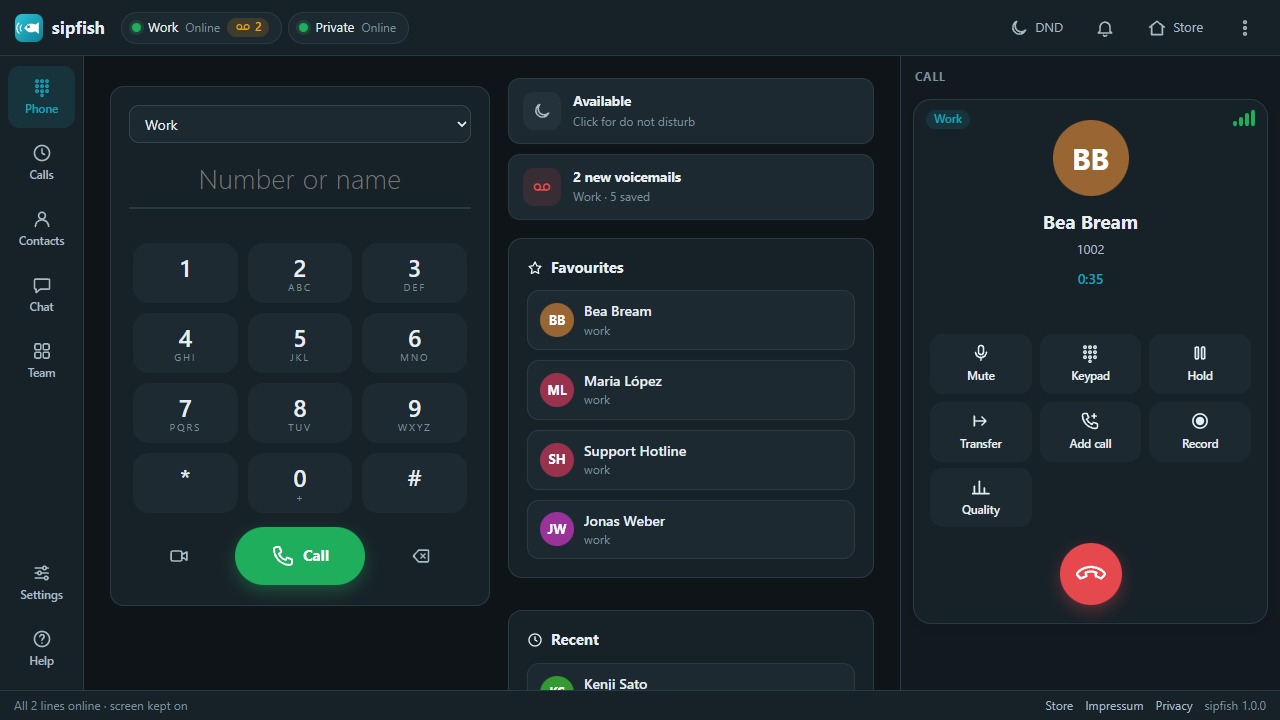
A complete SIP phone in your browser: connect to your office PBX or cloud phone system over a secure WebSocket and make and take calls with HD audio and video – several lines, transfer, conference, busy lamps, voicemail, chat, encrypted backups and one-click setup for whole teams. Nothing is stored on any server.
Runs in your browser – nothing to install.
sipfish turns the browser into a full desk phone. It speaks SIP over secure WebSockets and carries the calls as WebRTC (Opus, G.722, G.711) straight between your browser and your phone system – Asterisk, FreePBX, FreeSWITCH, Kamailio or any cloud provider that offers WebRTC. There is no sipfish server in between: accounts, contacts, call history and messages stay in your browser.
Everything a softphone needs: several lines at once with a default line, call waiting, hold, mute, key presses (RFC 4733 or SIP INFO), blind and attended transfer, a local three-way conference, call recording, video calls with screen sharing, early media, redirects, do not disturb, local call forwarding (always, busy, no answer), auto answer for intercom calls, blocked numbers, a voicemail indicator, busy lamps with call pickup, SIP messages (chat with typing indicator), call quality with MOS, jitter and packet loss, and a SIP trace for support.
Stays logged in: sipfish renews its registration on time, keeps the connection alive, reconnects on its own after network changes and tells you plainly when energy saving, sleeping tabs or sleep mode paused it – with a readiness check, wake lock, notifications with Answer / Decline, an installable app window and tel: / sip: link handling.
For yourself or for a whole team: set up your own lines in a minute, or use the Team studio to describe your company's cloud phone system once, add your colleagues and hand each of them an encrypted setup package – file, link or QR code – that only opens with their personal one-time code. Lines arrive with the company directory, busy lamps and the policies you chose.
Your data, encrypted: export and import accounts, contacts, history, messages, settings or the team workspace as files protected with AES-256-GCM (PBKDF2-SHA-256, 600 000 rounds), or move a line to another device with a link or QR code. An optional master password also encrypts the SIP passwords inside the browser.
Needs a phone system with SIP over WebSocket (wss://) and WebRTC enabled. Works in current Chrome, Edge, Firefox and Safari; desktop recommended.
No comments yet.
See a spinning black hole as it would really look: every pixel is a light ray traced through the Kerr spacetime, with frame dragging, Doppler and gravitational shifts, an accretion disk and your own 3D objects.
A complete music studio in your browser: arrangement and session view, synths, drum racks, effects, sound packs, MIDI controllers, automation, recording and WAV export.
Resize, convert (PNG, JPEG, WebP) and compress images right in your browser – nothing is uploaded.
Turn a song into a YouTube-ready music video: audio-reactive visualizers, lyrics, photos and effects, rendered to MP4 right in your browser.


Log in to write a comment or reply. A moderator checks every comment before it appears – for security and to keep spam and abuse out.